The board
Everyone knows what's next
The board shows what is happening live, for office and site, so work starts without a status call.
Free to try. No credit card needed.
See it live
Move a card before you move your project.
RENO-36
Shower drain moved 200 mm in revision 3. Check the joist direction before the screed goes in.
RENO-31
Approve the lighting plan
RENO-34
Order the sanitary fixtures
RENO-35
Request a quote for the floor screed
RENO-28

Confirm tiling quantities with the contractor
RENO-22

Schedule the electrical inspection
RENO-19

Sign off the structural drawings
RENO-12
Deliver the moodboard to the client
RENO-36: Shower drain moved 200 mm in revision 3. Check the joist direction before the screed goes in.
Created by Sanne de Vries, 2 weeks ago
Shower drain moved 200 mm in revision 3. Check the joist direction before the screed goes in.
Drop files or click to browse
Walked the bathroom with the carpenter: the joists run the other way here, so the moved drain clears them. Plan and shower wall marked up and attached.
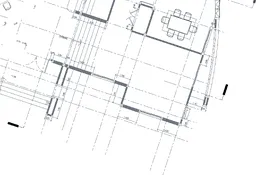
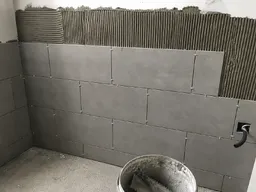
Thanks @Sanne de Vries, then the screed can go in on Friday as planned.
Please build from revision 3. The earlier sheet still shows the drain in its old position.

Understood, we will hold the shower tray order until this is settled.

Screed supplier confirms delivery in week 33 if the order goes in before Friday.
RENO-31: Approve the lighting plan
Created by Sanne de Vries, 2 weeks ago
Two proposals from the architect: warm recessed spots or a track system. The client decides after the showroom visit on Thursday.
Drop files or click to browse
Showroom visit is set for Thursday 10:00, both options will be on display.
Perfect. I will bring up the dimmer question as well.
RENO-28: Confirm tiling quantities with the contractor
Created by Sanne de Vries, 2 weeks ago
Recount the bathroom walls with the contractor: the supplier needs final quantities before Friday to hold the delivery slot.
Drop files or click to browse
Recounted the long wall: 24.6 m2 instead of 22. I adjusted the order sheet.
Good catch, that explains the shortage on the first count.
Supplier confirms delivery in week 33 if we order before Friday.
Ordered. The confirmation is in the file library.
RENO-22: Schedule the electrical inspection
Created by Tomás Oliveira, 2 weeks ago
The distribution board must be approved before the walls close. The inspector asked for the revised drawing up front.
Drop files or click to browse
The inspector can come Tuesday morning, I have blocked the slot.
RENO-12: Deliver the moodboard to the client
Created by Sanne de Vries, 2 weeks ago
Kitchen moodboard with the final material choices, handed to the client for approval.
Drop files or click to browse
Love the oak with the matte black handles. Approved from our side!
Drag a card, open one, try it. This is the real component your team would use.
The short version
1 s
From drag to every screen
A moved card is visible to the whole project within a second.
6
Languages
The board, the product and its mail, in the whole crew's words.
0
Installs on site
Any phone, in the browser, nothing to install.
From zero to live
Your first board, live this afternoon
-
01
Create the project
The board arrives ready: Ready to pick up, To do, In progress, Inspection, Completed.
-
02
Invite office and site
Team, subcontractors and the client each see exactly their project.
-
03
Work from the board
Cards move, everyone follows, and the status call disappears.
That's it. No setup project, no consultant.
Ready when you are: the first board is free.
Start for freeLive for everyone
Watch the work move
When the site drags a card, the office sees it slide. What is waiting, what is moving and what is done: everyone on the project sees the same board the moment it changes, without refreshing a thing.
How the project is doing is visible on screen straight away.
From idea to done
Capture it without it demanding action
Write an idea down the moment you have it: type a title, press enter, done. It waits in the backlog, out of the way, until the moment is right.
Only when you put it on the board does it become work someone picks up. Nothing gets lost between the site and the office, and nothing clutters the board before its time.
A shared language
Say RENO-22 and everyone knows
Every card gets a short code of its own, and every project its own letters: RENO, WYR, whatever fits the job. A phone call about "snag RENO-22" replaces a paragraph of description, and there is never any doubt which card you mean.
A card can also belong to the electrician before you know which electrician: assign the trade, and the work is owned while the team is still forming. How that works is on the collaboration page.
The most loaded word in the trade
Additional work never becomes an argument at the invoice
Mark a card as additional work the moment it comes up. You can see at a glance what falls inside the agreement and what falls outside it, and the card keeps a record of what was added and who approved it. Work that is dropped gets the same treatment, which keeps the record fair in both directions.
Six months later, "where did that number come from" has an answer you can point at: the card, its history, and the conversation that sits on it. Export the board to PDF and the argument at the invoice never starts.
Why a board, not a planning tool
Planning says what should happen. The board shows what is happening.
A schedule looks months ahead; the board runs the day. Capture work fast, decide in the open, finish visibly.
Most teams keep their planning software and drop the mail threads, the spreadsheets and the Monday status calls. The board takes over the daily coordination, which is where the noise lived. Columns come ready for building work: Ready to pick up, To do, In progress, Inspection, Completed. And when paper is the right tool, the board exports to a tidy PDF for the site meeting.
Less noise. More progress.
Questions about the board
How does the board handle additional work?
It gets its own card, typed as additional work, the moment the scope grows. The card carries when it was added, the conversation about it and who agreed, so at the invoice there is a record to point at instead of a memory to argue about. Dropped work is recorded the same way, which keeps the record fair in both directions.
Can the site crew work with it?
Yes. The board works on any phone in the browser, no app to install. Moving a card or adding a photo takes seconds, and the office sees it the moment it happens.
Do I have to set up the board myself?
No. Every project starts with columns that fit building work: To do, In progress, Inspection and Completed. Add labels, epics and roles when you want more structure; the board is useful from the first minute.
Can we bring in the task list we keep in Excel?
Yes. The backlog imports cards from a spreadsheet, so the list you keep today becomes cards in one batch. From there you move them onto the board whenever the work is ready to start.
Who sees which board?
You decide per project. Your team sees the projects they work on, a subcontractor sees only theirs, and a client can follow progress without the internal back and forth.
Can subcontractors or clients without an account follow the work?
Yes. Assign them to a role, and they receive a short email digest of the cards that concern them, without creating an account and without seeing the project itself. Informing someone never means letting them in.
Does the board replace our planning software?
The board runs the daily flow of work, not the months-ahead schedule. Most teams keep their planning tool and stop using mail, spreadsheets and status calls for day-to-day coordination.
Dig deeper
The full guides behind this page, in plain language.
Put your next project on the board
Free to try, no credit card needed. Invite your team when you are ready.
Start for free